home Gateway Carousel, Resources and Services Fast, Easy Laptop Checkout at Ellis Library

Fast, Easy Laptop Checkout at Ellis Library

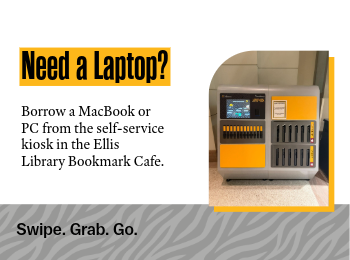
Students, faculty and staff who need a laptop can check one out from a new self-service kiosk in the Ellis Library Bookmark Café. The kiosk offers both MacBooks and PCs with standard Mizzou software, as well as portable battery chargers.

Laptops can be checked out for up to 24 hours with a valid MU ID card or digital ID.

Checking out the laptop requires four easy steps:

  1. SELECT
    Choose a Mac, PC or battery pack
  2. SWIPE
    Use your valid MU ID
  3. GO!
    It’s yours for 24 hours
  4. LOG OFF and RETURN
    Don’t forget to log off before you return the laptop to the kiosk.

Laptop Kiosk FAQ

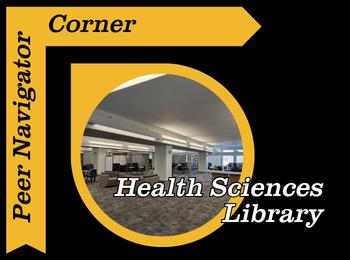
Peer Navigator Corner: Health Sciences Library

Written by: Emilee Dillon 

The J. Otto Lottes Health Sciences Library is one of many specialized libraries on campus here at Mizzou. If you’re looking for a new study spot, a group project space, or somewhere to cozy up with a good book, the Health Sciences Library may be a place for you to check out.

One thing I have heard a lot is the struggle to find flexible, comfortable seating in libraries. The good news is the Health Sciences library has you covered! Provided are individual podded chairs that offer comfortable seating and include a footrest, lights, and even an outlet. These pods offer more secluded, comfortable seating, with all the necessities provided, so you can stay comfortable while working on your studies. Walking through the student center, I have also noticed that the booths downstairs and upstairs are very popular. While Ellis does have a few booths on the 1st floor, the Health Sciences Library has a whole wall of booths and a few other sections as well. Also, if after sitting in classes all day you feel the need to take a break from sitting, but you also know you need to study, the Health Sciences Library has standing desks!

Although the Health Sciences Library has plenty of research material that is not the only thing it is used for, nursing and medical students can check out some course-specific textbooks right from the library! If you need a break from studying, you can also find a wide variety of books to read for leisure near the front of the library.

I have realized that students here at Mizzou love whiteboards, and this library delivers. There are double-sided mobile whiteboards for students to use, as well as large whiteboards near tall tables, perfect for group work or mind-mapping. If you’re like me, near finals, TikTok is a popular place to go for study motivation. The health sciences library has the popular floor-to-ceiling whiteboards featured in these study-hack videos in their study rooms, which are perfect for memorization or just organizing your ideas.

The health sciences library also has excellent lighting, warm, cozy yellow, rather than the harsh white lights that can make it difficult to focus. There is also a part of the library that, during daylight hours, has excellent natural light and a beautiful view of Stankowski field.

As mentioned before, the Health Sciences library has private and group study rooms that can be reserved here at the Missouri Libraries website!  It is also important to mention that the Health Sciences Library is open to all majors. While medical and nursing students have longer hours, they may access the facility; all students are welcome and encouraged to use the library.

You can find more information on the Health Sciences library, including their hours and location, on their website, J. Otto Lottes Health Sciences Library.

home Resources and Services Your Subject Librarian Can Support Your Teaching and Research

Your Subject Librarian Can Support Your Teaching and Research

The subject librarians at the Mizzou Libraries serve as academic partners for faculty, departments and research teams across campus. With expertise in specific disciplines, they help connect faculty with the collections, services and research support needed for teaching, scholarship and student success.

Faculty can work with subject librarians in several ways. Subject librarians develop collections that support current and emerging curricular and research needs, serve as liaisons between academic departments and the Libraries, and provide specialized research assistance for faculty and students.

As collection specialists, subject librarians collaborate with faculty to identify resources that support instruction, course development and scholarly inquiry, including books, journals, databases and other materials. These partnerships help ensure that library collections remain aligned with departmental priorities and evolving areas of study.

Subject librarians also serve as primary contacts for departments, sharing timely information about library resources and services while bringing faculty needs and perspectives back to the Libraries. This liaison role supports stronger communication, more responsive services and deeper collaboration between the Libraries and the academic community.

Faculty are encouraged to consult with their subject librarian on research projects, course assignments and effective use of print and online resources. Subject librarians can provide guidance on copyright, citation metrics, citation managers, data management, literature reviews, open access, open educational resources, digital repositories and more. They can also help connect students with research support for assignments and projects. Contact your subject librarian today!

home Resources and Services Non-Generative AI Features Expanding Across Library Databases

Non-Generative AI Features Expanding Across Library Databases

As artificial intelligence tools become increasingly common in research products, many database vendors are integrating AI features directly into their platforms. Several major research databases that the Mizzou Libraries subscribe to are providing new ways for users to discover and interact with information.

Researchers may notice different types of AI features depending on the database they are using:

  • Discover@MU includes AI Assisted Search (formerly Natural Language Search), which users can choose to enable.
  • JSTOR offers an AI Research Tool that users can toggle on.
  • ProQuest databases include a Research Assistant that automatically appears when a search is performed.
  • SciFinder provides CAS Newton, allowing users to choose between a traditional search and an AI-powered search experience.

These vendor-developed AI tools are built directly into the databases and are not controlled by Mizzou Libraries. As a result:

  • Librarians cannot disable, hide or restrict access to these features.
  • AI functionality may vary from one database to another.
  • Librarians are actively evaluating these tools and developing guidance and instruction to help patrons use them effectively.

It is also important to distinguish these vendor-integrated AI features from AI tools that Mizzou Libraries has intentionally licensed and recommended for campus use. These librarian-evaluated tools include:

These resources have undergone review and evaluation by Mizzou Libraries and were selected to support teaching, learning and research.

Questions about an AI feature you’ve encountered in a library database? Contact your subject librarian for assistance. Librarians are available to help researchers understand AI-powered research tools and make informed decisions about their use.

home Ellis Library, Resources and Services Peer Navigator Corner: Digital Media Lab

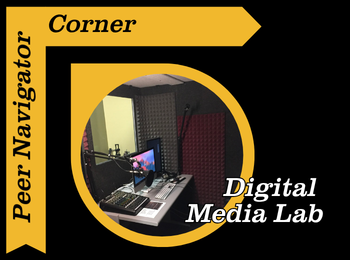
Peer Navigator Corner: Digital Media Lab

Written by: Mekenzie Moffet

One resource on campus that I feel like a lot of students don’t realize they have access to is the Digital Media Lab located in Ellis Library. If you’ve ever needed to edit a video, record a podcast, create a presentation, or even just want a quiet space with good equipment to work on a project with, this is definitely the space worth checking out. If you’re wanting to try this, don’t let the talk of fancy equipment and reserving space stress you out! There’s always help available, whether you stop by the Peer Navigator desk for help reserving the lab space or get assistance from Digital Media Lab staff while using the equipment!

The Digital Media Lab is designed to give students access to different technology and software that we might not have on our personal laptops. They have high-quality computers with programs like Adobe Audition for video editing, audio recording, graphic design and other creative projects. For students in classes that may require you to make presentations or multimedia assignments, this could be a helpful resource so you don’t have to worry about your personal computer struggling to run larger programs. 

Another really useful part of the lab is the equipment. Things like high quality microphones, cameras, lighting equipment and other recording tools are available for students; whether for school or personal projects! So, if you’re recording a presentation, filming an interview, or working on a creative assignment, having access to that kind of equipment all for free can make a big difference in what you produce.

Just like everything at the library, the labs spaces for recording and editing are completely free! You just have to reserve the space and time like a study room. The Peer Navigators recently got a new project to create our own personal podcast, and I’m one of the people recording our monthly episodes, so trust me when I say I understand the struggle of using this equipment for the first time. During one of our weekly meetings, we met with Joey, who works specifically with the Digital Media Lab, and he walked me and my coworkers through how to use all the equipment and answered any questions we had.

My first recording was a few weeks after that training, so honestly, I didn’t remember much. Thankfully, like always, there was a staff member there who helped refresh our memory, and we were able to get started. Recording itself really isn’t too difficult, even coming from me, someone who’s not great with technology. Another huge plus is that the computers you record on can also be used for editing, and they have GarageBand and Adobe programs available for free. I definitely recommend trying something like this out.

It’s completely okay if you don’t know how to use the equipment yet. When you make a reservation it ensures that some of the amazing staff will be on hand to answer all of your questions, walk you through a program for the first time, help you get started with programs and point you towards resources if you’re learning. That support can make trying out new tools feel a lot less intimidating. Staff are always available in the Digital Media Lab, located in Room 153 on the first floor of Ellis, to help with whatever you need.

Overall, the Digital Media Lab is one of those campus resources that can really elevate your project quality and give you the chance to learn new tools. So go check it out because it’s worth stopping by and seeing what’s available. If you’re having trouble locating their website, just click the Digital Media Lab link located at the top, or go to the libraries home page and search in the box at the top right corner!

home Gateway Carousel, J. Otto Lottes Health Sciences Library, Resources and Services Discover LeapSpace: An AI-Powered Research Workspace

Discover LeapSpace: An AI-Powered Research Workspace

Researchers today face an overwhelming volume of scholarly literature, making it increasingly difficult to stay current, identify relevant sources and synthesize information efficiently. To help address these challenges, Mizzou Libraries now offers access to LeapSpace, Elsevier’s research-grade AI workspace designed to accelerate discovery, deepen understanding and support every stage of the research process.

LeapSpace combines publisher-neutral scholarly content, responsible AI technology and enterprise-grade security in a single workspace. Whether you’re exploring a new research topic, conducting a literature review, identifying funding opportunities or developing a manuscript, LeapSpace can help you work smarter and more efficiently.

Ask Research Questions in Natural Language

Using LeapSpace is as simple as asking a question. Researchers can enter inquiries in a natural, conversational style and receive synthesized responses drawn from scholarly literature. The platform is designed to support complex, interdisciplinary research topics, helping users quickly navigate unfamiliar concepts and cross-field connections.

Key Features

Topic Overview

Get up to speed quickly with concise overviews that highlight key concepts, themes, and findings related to your research topic.

AI-Powered Summaries

LeapSpace synthesizes information from relevant scholarly documents, helping researchers understand large bodies of literature without reading every article in full.

Trust Cards

Evaluate AI-generated insights with confidence. Trust Cards provide supporting references and include a “Link to Statement” feature that shows how closely an AI-generated claim aligns with the original source material.

Follow-Up Conversations

Refine your research by asking follow-up questions, allowing you to dig deeper into specific concepts, methodologies, or findings.

Claim Radar

Explore how a particular claim is supported across the broader research landscape, making it easier to identify consensus, differing perspectives, and evidence strength.

Funding Insights

Discover funding opportunities and investigate funding sources connected to specific research areas.

Deep Research

Generate detailed research plans and conduct extensive literature searches across curated scholarly content. Deep Research continuously refines its approach as new insights emerge, helping researchers uncover connections and opportunities they might otherwise miss.

Writing Coach

Support your scholarly writing process with a dedicated workspace designed to help strengthen arguments, contextualize evidence and identify gaps in reasoning.

Supporting Research at Every Stage

From exploring a new topic to preparing grant proposals and drafting manuscripts, LeapSpace offers tools that can save time while promoting responsible use of AI in research. By combining trusted scholarly content with transparent AI assistance, the platform empowers researchers to focus on analysis, creativity and discovery.

Whether you’re a faculty member launching a new project, a graduate student conducting a literature review, or an interdisciplinary research team exploring emerging questions, LeapSpace can help streamline your workflow and enhance your research process.

Ready to get started? Visit the Mizzou Libraries LeapSpace guide to learn more and begin exploring this powerful new research workspace.

Click here for faculty-focused workshops and demos.

Click here for graduate student workshops and demos.
home Gateway Carousel, Resources and Services Read, Recharge and Refocus with the Wellbeing Collection

Read, Recharge and Refocus with the Wellbeing Collection

The Wellbeing Collection consists of hundreds of new books for students, faculty and staff who want to focus on their mental health or just need a break from the stress of everyday life. The collection can be found on the first floor in Ellis Library, near the atrium (just ask any staff member to point you in the right direction).

The collection includes books from the following subject categories:

· General Wellbeing: sleep, yoga, movement, meditation

· College Basics: cooking, time management, laundry, dorm life

· Student Success: study tips, note-taking, first-year support, first generation student topics

· New Adulting: budgeting, personal finance, relationships, communication

· Mental Health: stress relief, anxiety and depression, happiness, neurodivergence support

· Skill Development: leadership, public speaking, self-help

· Leisure Reading: popular fiction and non-fiction titles

· Hobbies: gardening, crochet, manga drawing, gaming

This collection was made possible by Mizzou Forward Student Success Enhancement Grant.

New Open Journal Finder Helps Mizzou Researchers Identify Publishing Options

The Mizzou Libraries now offer a tool to help Mizzou researchers identify journals where they can publish their work. The Open Journal Finder provides an easy way to explore journal publishing options, including open access status, article processing charges, and library-supported discounts or agreements.

Researchers can use the Open Journal Finder to look up individual journal titles and find important publishing details in one place. For each title, the tool may include the following information

  • whether the journal is fully open access, hybrid open access, or not open access;
  • whether article processing charges (APC) apply;
  • whether Mizzou Libraries support all or part of the APC (support only available for Mizzou-affiliated researchers);
  • instructions for authors;
  • the number of articles published by Mizzou authors in the journal over the last five years; and
  • how often Mizzou researchers have cited articles from the journal in the last two years.

When a journal is labeled “Library Supported” above the open access icon, Mizzou Libraries offers APC support for that title to Mizzou researchers. Researchers should click the journal title to view complete details, including any remaining costs they may be responsible for. Because not every title from a publisher is included in Mizzou’s APC agreements, researchers should always check the Open Journal Finder before submitting an article.

The tool also helps clarify common publishing categories. Fully open-access journals make all articles freely available, while hybrid journals include both open-access and subscription-only articles and may require an APC for open-access publishing. Journals that are not open access are marked with a gray lock icon. By bringing together publication costs, open-access status, author instructions, and MU-specific publishing metrics, the Open Journal Finder gives researchers a clearer picture of their options before they submit their work.

For more information about journal metrics, visit the Mizzou Libraries guide on journal rankings.

Chat with the Librarians Wherever You Are

Need research help? Working on a paper or project? You can ask a librarian for help using our chat service– almost 24 hours a day.

During the day you can chat with Mizzou librarians and library staff. At night, we offer access to a chat reference service called ChatStaff. They will be able to answer most research questions, except for some that are Mizzou-specific.

To access the chat service and see what hours chat reference is available, visit libraryanswers.missouri.edu.

home J. Otto Lottes Health Sciences Library, Resources and Services Overview of Recent University of Missouri Publications in Medicine and Related Fields: August 2026

Overview of Recent University of Missouri Publications in Medicine and Related Fields: August 2026

Each month we provide an overview of University of Missouri School of Medicine faculty-authored articles in medicine and related fields as well as a featured article with the highest journal impact factor.

This month’s featured article, “Early Detection and Surveillance of the SARS-CoV-2 Variant BA.3.2”  was co-authored by Dr. Marc Johnson of  Molecular Microbiology and Immunology. The article was published in MMWR Recommendations and Reports (impact factor of 51.3 in 2025).

See the list of publications in medicine and related fields we retrieved for this month: https://library.muhealth.org/facpubmonthlyresult/?Month=August&Year=2026