home Ellis Library, Resources and Services Peer Navigator Corner: Before the Walls Went Up

Peer Navigator Corner: Before the Walls Went Up

The Grand Reading Room – Then and Now
Written by: Ben Atterberry

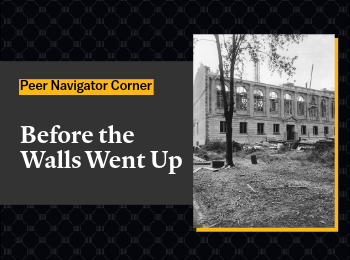
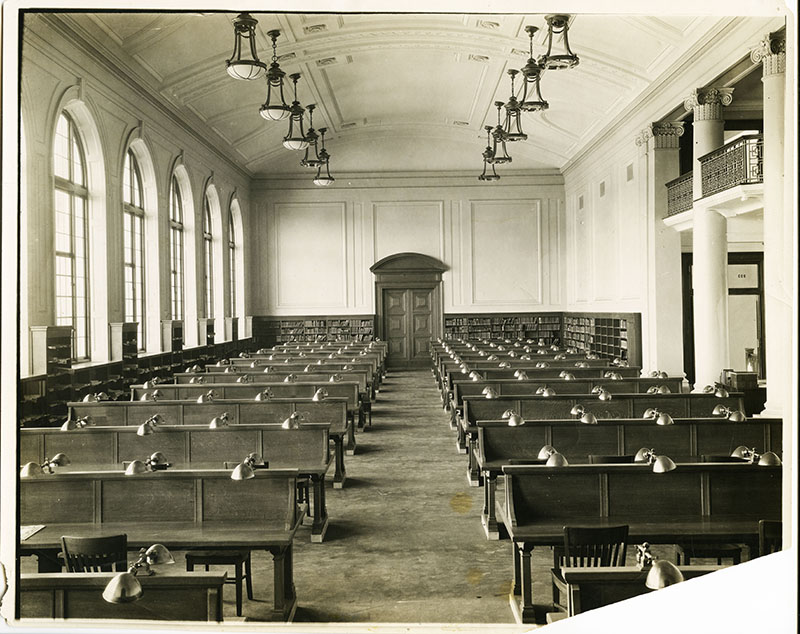
The next time you study in Ellis Library’s Reading Room, take a moment to look around. The room may feel familiar, but it looked strikingly different when Ellis Library opened in 1915: unfinished, dimly lit, and open on one side to the rest of the building. According to the University Libraries’ Ellis Old and New page, the room was not finished when the library opened. A 1914 photograph shows it still being put together, with light fixtures on one side lacking the glass globes found on fixtures elsewhere in the room. The coffered ceiling was left plain white at the time, and it stayed that way until the room was freshened up in 2003 – nearly 90 years after the room first opened the ceiling and wall details were finally painted. 

The room was also initially more open to the rest of the library. In a 1915 photograph looking south, no partition separates the room from the hallway; students at the tables could see straight past the columns into what used to be the Delivery Room, where a card catalog was used to request and pick up books. That sightline doesn’t exist anymore. A partition now closes off the gap between the columns, though the archive doesn’t specify exactly when it went up. The old Delivery Room itself was turned into Room 213, a space built in the late 1990s that now houses the library’s Electronic Classroom. At the time, that was the extent of the second floor – there were no east stacks, and the connecting reading room where the cast gallery is now didn’t exist. 

In 1936 a second, connected reading room (now room 202) was added to the Grand Reading Room almost doubling the size of the space. The room’s purpose shifted over the decades: the architect’s 1936 plan shows a desk near the West Stacks doors where books could be requested, and by 1955 the room served as the Reserved Book Reading Room. These changes are easy to miss on a normal walk through the library. To help visitors explore Ellis Library’s past and present, University Libraries maintain a Now and Then Photographs guide, pairing historical images with photos of the same spots today. So, on your next study session, picture the room as it looked in 1915: unfinished, partly lit, and open to the hallway. The quiet space students know now took decades to take shape and included one very delayed paint job. 

Explore more: 

home Resources and Services 2026 Reading Challenge: September Recap and October Preview

2026 Reading Challenge: September Recap and October Preview

In September, we challenged you to read Any Book from the Columbia Public Library One Read List . Our September winner is Kori Martiny who won their choice of a mizzou or a bookish prize.  To be eligible for the prize drawing, make sure to read a book that fits the month’s theme and then tell us about it.

We are excited to see all the banned books you choose to read in October. Need some suggestions? Dr. Sam Cohen, Associate Professor in the Department of English and author of Banning Books in American- Not a How-to created a list of banned books recommendations.

You can view the list at this link: https://libraryguides.missouri.edu/c.php?g=1537064&p=11522812#s-lg-box-wrapper-42592176


Congratulations to everyone who participated in the September reading challenge. Here are some of the titles you read last month:

Remarkably Bright Creatures

“I absolutely loved this book! Such a unique story to tell through the eyes of an octopus. Connecting the two main characters through medial tasks was so fun to following along with and see how the story plays out. A great story about heartbreak, finding yourself, and realizing animals are brighter than we think they are!” – Zoe


Bettyville

“This book was so good. The author grew up in a town 20 minutes away from where I grew up and live in, he even mentioned my city a few times. Not only that, he also went to Mizzou! It was so interesting to see someone talk about the area I know so well. The people he described are people that while I don’t personally know, I know people exactly like them. The way Hodgman talked about his relationship with his family, and especially his mother was so real and sad and beautiful. I definitely recommend this book.” -Addison


Station Eleven

“This was such an interesting read and not at all what I expected when I first picked up this novel. I expected the typical post-apocalyptic world of survival but did not expect the tales of hope. I especially loved the aspect of keeping the arts alive even in the midst of terrible suffering. One of the lines that sticks with me is about survival alone being insufficient.” – Amanda


You can see more of the books read in September at this link: https://libraryguides.missouri.edu/c.php?g=1537064&p=11695410#s-lg-box-wrapper-43181947

TAGS:

Taira Meadowcroft

Taira Meadowcroft is the Public Health and Community Engagement Librarian at the Health Sciences Library at the University of Missouri.

home Gateway Carousel, Resources and Services Lean Library Allows You to Access Mizzou Libraries—Anywhere, Anytime

Lean Library Allows You to Access Mizzou Libraries—Anywhere, Anytime

Lean Library is a free browser extension available to all current Mizzou students, faculty and staff. Whether starting your research on Google Scholar, a publisher’s site, or anywhere else online, Lean Library helps you seamlessly connect to library resources when you’re off campus or not on Tiger WiFi.

Here’s how it works:

  • Automatically checks if Mizzou Libraries has access to the article or book you’re viewing.
  • Provides direct links to full-text content when available.
  • Prompts you to log in using MU’s Single Sign-On (SSO)—just like email or Canvas.

4 simple steps to get started

Step 1: Go to Lean Library Extension
Step 2: Install the extension
Step 3: Select the University of Missouri, Columbia
Step 4: Search for articles and journals, and enjoy quick access to all library resources


Need something we don’t have?

Lean Library makes it easy to request articles and books through our Interlibrary Loan (ILL) service—at no cost to you.

For more information, visit our Lean Library guide.

home Ellis Library, Gateway Carousel, Resources and Services Peer Navigator Corner: Who Do I Ask?

Peer Navigator Corner: Who Do I Ask?

Written by: Mekenzie Moffet

Ellis Library isn’t just books – there are many people who can help you, but it can sometimes be confusing to know who to ask. Below is a quick guide to finding the right person!

Peer Navigators

Peer Navigators are a great place to start because we can point you in the right direction—even if that’s another person who can fully answer your question. We can help you find locations throughout the library and assist with basic technology tasks, such as:

  • Directions both inside the library or across campus
  • Fixing common printer problems
  • Downloading the printer software so you can print from your own computer
  • Finding scanners, computers, study spaces, and other library resources
  • Searching the catalog for books and where to find the call number

Circulation Desk

The North and West service desks, also called the Circulation Desk, can help you:

  • Find and check out books
  • Return or renew library materials
  • Ask questions about your library account
  • Checking out equipment like phone chargers, video cameras, or self care and sensory kits

Subject Librarians

Subject librarians are your go-to people for research help. They specialize in different academic subjects and can help you:

  • Find reliable sources for assignments
  • Navigate library databases and tech tools like research AI
  • Develop or narrow down a research topic and create better search terms
  • Find materials related to your major or class
  • Find specialty information like legal policy, data, or statistics

Writing Center

The Writing Center, located in Ellis Library Room 115, can help during any stage of the writing process. You do not need to have a complete draft before making an appointment! They can help with:

  • Brainstorming and organizing ideas
  • Developing a thesis
  • Revising drafts
  • Improving citations
  • Working through writer’s block

Digital Media and Innovation Lab

The Digital Media and Innovation Lab can help with creative and media-based projects. This may include:

  • Recording or editing audio and video
  • Using media equipment and software
  • Working on podcasts, presentations, or other digital projects
  • Learning how to use unfamiliar creative technology

IT Help

For more complicated problems, such as your computer crashing or other high-tech issues, you will need help from IT. Divisions of IT staff are sometimes available at the desk on the first floor next to printer station 3A–D, which is surrounded by “Help Station” posters.

  • Bring anything technological to them

If you are ever unsure about who to ask, don’t be afraid to start with a Peer Navigator. Even if we cannot solve the entire problem ourselves, we can help you find the person who can!

home Gateway Carousel, Resources and Services Book a Librarian for Research Help

Book a Librarian for Research Help

Whether you are starting your first research project or have written a dozen articles, you can benefit from a consultation with a librarian. It’s free and you can book online in advance according to your schedule.

Librarians can meet with you virtually or in-person.

MU Students can use Canvas to schedule an appointment via MU Connect* and meet with the librarian assigned to your class. Students, if you book a research consultation with a librarian, you can earn a point towards your S.T.A.R. recognition.

MU Faculty and Staff can fill out the form to schedule an appointment.

*What is MU Connect, and how do you use it? Watch this short video to find out and make an appointment today.

home Events and Exhibits, Gateway Carousel, Resources and Services Open Access Week 2026: The Cost of Knowledge

Open Access Week 2026: The Cost of Knowledge

Mizzou Libraries invites you to join us for International Open Access Week 2026 (October 19-25), a global event focused on increasing awareness and understanding of open access and scholarly communication. This year’s theme, “The Cost of Knowledge,” explores the growing financial barriers to accessing and sharing research, while examining who bears those costs and who benefits from the current system.

Throughout the week, Mizzou Libraries will offer a series of online workshops designed to help researchers, students and authors navigate the scholarly publishing landscape. Topics include identifying predatory journals, understanding open access publishing options, building a research identity as an undergraduate scholar, and protecting your rights as an author through copyright awareness. Whether you are just beginning your research journey or preparing your next publication, these sessions will provide practical strategies for making informed decisions about sharing and accessing knowledge.

Join us as we explore how open access can advance human understanding, increase the visibility of research, and support a more equitable scholarly communication ecosystem. All workshops are free, but registration is required.

Predatory Journals: The Dark Side of Open Access

Date: Monday, October 19, 2026
Time: 1:00pm – 1:45pm
Registration

Open Access Publishing: Expanding the Reach of Your Research

Date: Tuesday, October 20, 2026
Time: 1:00pm – 1:45pm
Registration

Undergraduate Researchers: Your Research Identity & Publishing Opportunities

Date: Wednesday, October 21, 2026
Time: 1:00pm – 1:50pm
Registration

Copyright for Authors

Date: Thursday, October 22, 2026
Time: 1:00pm – 1:45pm
Registration

home Gateway Carousel, Resources and Services How to Find Ebooks at Mizzou Libraries

How to Find Ebooks at Mizzou Libraries

Mizzou Libraries has access to many ebooks and we have an easy way for you to search for them.

Go to library.missouri.edu and type out your topic or the name of the book (put the title in quotation marks for best results) you are looking for in the search box. Click the search button (see the image below for an example).

For books in health sciences, take a look at the Health Sciences Library ebook page.

For books in veterinary medicine, take a look at the Zalk Library ebook page.

For books in journalism and communication, take a look at the Journalism Library ebook page.

If you get stuck or have a question, our 24/6 chat is on the right hand side of the screen. We are here for you. In addition, visit our Finding Ebooks page for more information, including how to download ebooks.

Scroll down through the search results until you see Filter by Format on the left hand side. Choose Ebook and Electronic Resources. If these options do not show up, choose Show More, then click Ebook and Electronic Resources. At the list of results, filter by “Library Location – MU Online Library” to see titles accessible to MU patrons (we can’t use ebooks from the other UM campuses).
list of source types

home Gateway Carousel, Resources and Services Fast, Easy Laptop Checkout at Ellis Library

Fast, Easy Laptop Checkout at Ellis Library

Students, faculty and staff who need a laptop can check one out from a new self-service kiosk in the Ellis Library Bookmark Café. The kiosk offers both MacBooks and PCs with standard Mizzou software, as well as portable battery chargers.

Laptops can be checked out for up to 24 hours with a valid MU ID card or digital ID.

Checking out the laptop requires four easy steps:

  1. SELECT
    Choose a Mac, PC or battery pack
  2. SWIPE
    Use your valid MU ID
  3. GO!
    It’s yours for 24 hours
  4. LOG OFF and RETURN
    Don’t forget to log off before you return the laptop to the kiosk.

Laptop Kiosk FAQ

Peer Navigator Corner: Health Sciences Library

Written by: Emilee Dillon 

The J. Otto Lottes Health Sciences Library is one of many specialized libraries on campus here at Mizzou. If you’re looking for a new study spot, a group project space, or somewhere to cozy up with a good book, the Health Sciences Library may be a place for you to check out.

One thing I have heard a lot is the struggle to find flexible, comfortable seating in libraries. The good news is the Health Sciences library has you covered! Provided are individual podded chairs that offer comfortable seating and include a footrest, lights, and even an outlet. These pods offer more secluded, comfortable seating, with all the necessities provided, so you can stay comfortable while working on your studies. Walking through the student center, I have also noticed that the booths downstairs and upstairs are very popular. While Ellis does have a few booths on the 1st floor, the Health Sciences Library has a whole wall of booths and a few other sections as well. Also, if after sitting in classes all day you feel the need to take a break from sitting, but you also know you need to study, the Health Sciences Library has standing desks!

Although the Health Sciences Library has plenty of research material that is not the only thing it is used for, nursing and medical students can check out some course-specific textbooks right from the library! If you need a break from studying, you can also find a wide variety of books to read for leisure near the front of the library.

I have realized that students here at Mizzou love whiteboards, and this library delivers. There are double-sided mobile whiteboards for students to use, as well as large whiteboards near tall tables, perfect for group work or mind-mapping. If you’re like me, near finals, TikTok is a popular place to go for study motivation. The health sciences library has the popular floor-to-ceiling whiteboards featured in these study-hack videos in their study rooms, which are perfect for memorization or just organizing your ideas.

The health sciences library also has excellent lighting, warm, cozy yellow, rather than the harsh white lights that can make it difficult to focus. There is also a part of the library that, during daylight hours, has excellent natural light and a beautiful view of Stankowski field.

As mentioned before, the Health Sciences library has private and group study rooms that can be reserved here at the Missouri Libraries website!  It is also important to mention that the Health Sciences Library is open to all majors. While medical and nursing students have longer hours, they may access the facility; all students are welcome and encouraged to use the library.

You can find more information on the Health Sciences library, including their hours and location, on their website, J. Otto Lottes Health Sciences Library.