Publish Open Access for Free with New Read & Publish Agreements

Publishing open access is a great way to keep research open and retain your copyright. We do understand that publishing open access comes with a financial commitment that you wouldn’t necessarily have with traditional publishing.

To help offset costs, Mizzou Libraries has agreements with several publishers that offer discounts and support of article processing charges (APCs) for the following journals.

Want to learn more? Talk with your subject librarian about open access in your area.

Visit here for a complete list of discounts and APC support.

New Agreements:

American Chemical Society

Starting January 1, 2026, Mizzou Libraries has a Read & Publish agreement with the American Chemical Society. Authors will have the option during the publication process to have their open-access fees covered under this agreement. Click here for a list of ACS journals included in the UMECO Consortium agreement, which includes the University of Missouri.

Sage

The University of Missouri has a read-and-publish deal with Sage for open access for MU authors on its complete premier journals package for the calendar year 2026. Here is a spreadsheet of the Sage premier journals.

Springer

The University of Missouri has a read and publish agreement with Springer for open access for MU authors on all titles except Nature and Scientific American titles. The effective dates are January 1, 2026, to December 31, 2028.

home Gateway Carousel, Resources and Services, Staff news New ProQuest Digital Collections Now Available to Mizzou Researchers

New ProQuest Digital Collections Now Available to Mizzou Researchers

The Mizzou Libraries are pleased to announce that our users now have access to the ProQuest Digital Collections, which offers discipline-aligned, multiformat content and vast primary sources spanning six centuries to serve researchers and students of all levels. The subscription includes many rare and exclusive resources, encompassing over 160 million primary source items. With broad, affordable access to scholarly content, the resource supports Anthropology, Entertainment & Popular Culture, Global Studies & International Relations, History, Literature, Performing Arts, Visual Arts & Design, Black Studies, and Women’s Studies.

Todd L. VanPool, chair of the department of anthropology, stated, “Access to the ProQuest One Anthropology Collection…will be very useful for us, including (and perhaps especially) our students. This represents a significant enhancement to our research and teaching capabilities.”

Within this collection, we have access to:

  • ProQuest One Anthropology
  • Music Online: Classical Scores Library Collection
  • ProQuest One Performing Arts
  • Music Online: Listening Collection
  • ProQuest Global & International Studies Collection
  • Early Modern Collection
  • Historical Periodicals Collection
  • ProQuest History Vault Collection
  • U.K. History Collection
  • U.S. History Collection
  • ProQuest One Black Studies
  • ProQuest Historical Newspapers: Black Newspaper Collection
  • ProQuest Gender Studies
  • ProQuest One Literature
  • ProQuest One Entertainment and Popular Culture
  • Screen Studies Collection
  • Art, Design, and Architecture Collection
  • Fashion Studies Collection

You may access these databases from the Mizzou Libraries A-Z Databases List.

home Gateway Carousel, Resources and Services, Staff news New Laptop Self-Service Kiosk in Ellis Library

New Laptop Self-Service Kiosk in Ellis Library

Students, faculty and staff who need a laptop can check one out from a new self-service kiosk in the Ellis Library Bookmark Café. The kiosk offers both MacBooks and PCs with standard Mizzou software, as well as portable battery chargers.

Laptops can be checked out for up to 4 hours with a valid MU ID card or digital ID.

Checking out the laptop requires four easy steps:

  1. SELECT
    Choose a Mac, PC or battery pack
  2. SWIPE
    Use your valid MU ID
  3. GO!
    It’s yours for 4 hours
  4. LOG OFF and RETURN
    Don’t forget to log off before you return the laptop to the kiosk.

Laptop Kiosk FAQ

home Gateway Carousel, Resources and Services Finding the Best Study Space

Finding the Best Study Space

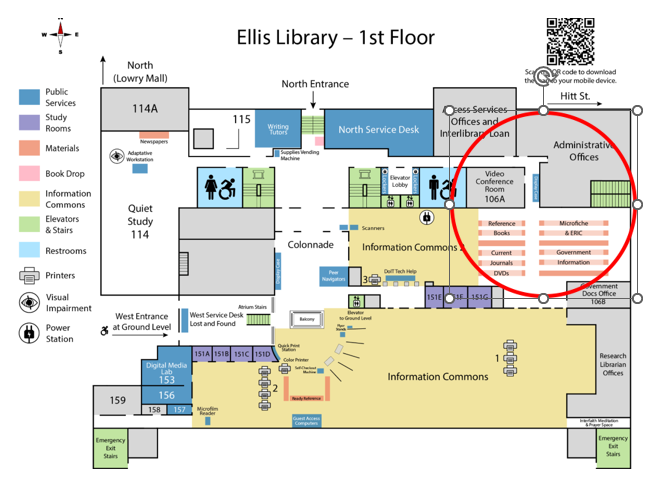
We have spaces for everyone! If you prefer silence, check out rooms 114, 201 (the Grand Reading Room) and 202 in Ellis Library. Check out this Ellis Library floorplan to see all the quiet spots. Journalism also has four private personal study pods on the bottom floor that are first come, first served.

If you don’t prefer complete silence, try the Information Commons (the first floor of Ellis Library). Or the Bookmark Café on the ground floor for coffee and conversation. You can always take a look at the Ellis Library sensory map to find the best study space for you.

If it’s a group study spot you are searching for, reserve one of the group study rooms in either Ellis, Engineering, Health Sciences or Journalism. They can be reserved for up to two hours for each group. Some also have Solstice monitors to help groups studying together share information with one another. Whatever you need, make sure and plan ahead, as rooms fill up quickly!

Remember, if your program has its own library, be sure to check out those spaces, as they are often designated specifically for you!

home Ellis Library, Gateway Carousel, Resources and Services, Staff news Peer Navigator Corner: Your Guide to LibGuides

Peer Navigator Corner: Your Guide to LibGuides

Written by: Isabella Bickhaus

Almost every time I write a blog post for the Libraries I find myself linking multiple LibGuides to provide more information for our readers. When brainstorming for this post, it occurred to me that you might not know what this library jargon means! In short, LibGuides (Library Guides) are library webpages, usually created by a librarian, that hold information regarding specific topics. 

Each LibGuide on our Libraries page was created to showcase resources on themes, to highlight available resources, and/or to assist with research for a specific course. If you took English 1000, there is a good chance that you encountered this Basic Research LibGuide. Course LibGuides range from pages supporting introductory Anthropology to graduate-level Civil Engineering. Finding a course LibGuide starts with selecting the “Course Guides” button on the library’s homepage, or searching for the number of your course in the top right corner. 

Not every course has a corresponding LibGuide, and if that is the case, subject LibGuides are a great resource. These are found through the same “Course Guides” link, and then using the left-hand navigation pane to switch to“Subject Guides.” The navigation pane is actually a great example of how LibGuides themselves are organized. Each one includes a main page with a general overview of the topic, with a navigation pane either on the left or as a set of tabs across the top of the page to navigate to more specific information related to that topic. 

LibGuides are not limited to research materials, but also include interesting resources that the library and Mizzou have to offer. For example, this LibGuide gives the inside scoop on the Fun Stuff at the Library. You can explore what the BYOB Book club is reading, or this Morbidly Curious LibGuide if you “prefer the darker side of non-fiction.” You can also find resources on things like voting and applying to graduate school. The library’s most popular LibGuide provides resources on determining Price and Wages by decade, beginning in the 1700s. 

Check out this list of all the LibGuides the library has to offer!

home Cycle of Success, Gateway Carousel, Resources and Services, Staff news What Does a Library AI Faculty Fellow Even Do?

What Does a Library AI Faculty Fellow Even Do?

When sharing that I’m the Libraries’ AI Faculty Fellow, the most common response is a polite nod followed by a puzzled, “So, what do you actually do?”
To start, there’s the deep dive into the world of AI. For libraries, this means going beyond ChatGPT, exploring research applications and research-specific AIs. It’s learning how models are trained, wrestling with questions about copyright and privacy, and attending presentations that range from webinars to an AI Summit hosted by the University of Florida. Essentially, it’s being a perpetual student of AI and then trying to translate that knowledge into actionable insights for the campus community.

Collaboration with other Faculty Fellows, committees, working groups and task forces is another big part of the role. As I learn about the variety of projects across campus, for example, the College of Education’s open-access AI instruction cookbook and Physical Therapy’s AI model that simulates patients for students to practice with, I help connect researchers who would benefit from the developing applications and use cases. I’ve participated in the development of department and campus AI policies by leading and consulting during policy workshops, and am involved in testing different GenAI models as part of the Show-Me AI pilot, trying to determine what might be the best applications for Mizzou to invest in and share.

Back in the library world, I chair a team testing research AI tools — like Keenious, Scite and Elicit — that might enhance the discoverability of library resources. But it’s not just about tools – we are getting more questions about AI on chat and through email all the time. I get to tackle the tough questions we receive, relating to AI hallucinations and whether library-subscribed journal articles can legally be used to train large language models for data extraction. With the disclaimer that, of course, I’m not a lawyer and can’t give legal advice, it means staying up to date on court decisions, lawsuits, and emerging legal frameworks (Updated Map of US Copyright Suits v. AI).

Of course, all this learning means nothing if it isn’t shared. In addition to traditional classroom instruction and library workshops, I’ve presented at the Directors of Graduate Studies Summit, as a panelist for a MOBIUS E-Resources webinar on AI, at a campus-wide donor event representing the work MU does with AI, at retreats for updating curriculum, at departmental trainings for graduate students, at the Missouri Library Association Annual Conference and more.
Sharing AI literacy information includes the creation (and continual updating) of our Libraries AI LibGuide, and collaboration with librarians from across the state to build an online AI resource guide. Outreach also includes training the Libraries’ student Peer Navigator team on AI so they can pass that knowledge along to their peers.

It’s been exactly one year since I became the Libraries’ AI Faculty Fellow. While there’s been a lot to learn, somewhere between the webinars, policy discussions and presentations, I get to have great conversations about how libraries can lead — thoughtfully, ethically and creatively — in an AI-driven world.

Kimberly Moeller
Librarian IV, Education & Social Sciences Librarian
University Libraries AI Faculty Fellow

home Gateway Carousel, Resources and Services Interested in Working for the Mizzou Libraries?

Interested in Working for the Mizzou Libraries?

Mizzou Libraries hire around 200 students each year to work in Ellis Library and the other specialized libraries on campus. To join our team of student assistants, please apply online here: library.missouri.edu/about/employment

Applications are accepted all year and reviewed as openings become available.

For more information, contact the University Libraries Administrative Offices at 573-882-4701 or in 104 Ellis Library.

Do you have work study?
Mizzou Libraries have multiple work study positions available. Click here to learn more about open work study positions.

Taira Meadowcroft

Taira Meadowcroft is the Public Health and Community Engagement Librarian at the Health Sciences Library at the University of Missouri.

home Gateway Carousel, Staff news World War II Posters Now Available on Digital Library

World War II Posters Now Available on Digital Library

September 2025, marked the 80th anniversary of the end of World War II, which took place over six years between 1939 and 1945. In honor of the anniversary, the Digital Initiatives department began digitizing posters from the War Poster Collection housed in our libraries’ Special Collections. This collection offers a fascinating time capsule of world history featuring posters from the United States, Czechoslovakia, Mexico, New Zealand, Norway, and Yugoslavia. Many posters cover topics such as patriotism, recruitment, war bonds, and saving stamps, among others.

Our digital library currently features 28 World War II posters, with more to be added in 2026. Browse highlighted posters from this collection below or view the entire collection here.


Poster showing a jar with assorted fruits and vegetables in the background.
Can all you can [graphic] : it’s a real war job! Poster showing a jar with assorted fruits and vegetables in the background.
Image of FDR hovers above a family standing by a grave.
“In the strength of great hope we must shoulder our common load” : buy victory bonds. Image of FDR hovers above a family standing by a grave.
Poster showing British lion and Canadian beaver armed with swords.
To victory (Canada). Poster showing British lion and Canadian beaver armed with swords.
Poster showing head-and-shoulders of a boy & a girl superimposed above youths picking potatoes.
Be a victory farm volunteer in the U.S. Crop Corps. Poster showing head-and-shoulders of a boy & a girl superimposed above youths picking potatoes.
Poster showing scene described in title
Back them up! [graphic] : heavy “Stirling” bombers raid the Nazi Baltic port of Lübeck and leave the docks ablaze.
home Ellis Library, Gateway Carousel, Resources and Services Peer Navigator Corner: Research Resources

Peer Navigator Corner: Research Resources

Written by: Jariyatu Abdul Rashid

The Mizzou Libraries are not just a place to borrow books; they’re a hub for research support. Sure, it has quiet study spaces and shelves stacked with books, but behind all of that is a network of resources designed to make your academic life easier. The library has tools to help with doing assignments, preparing for a presentation, or working on projects. Most of us take some courses that involve lots of writing, at least once, before graduation. And let’s be honest, writing usually comes with research. Even if you’re not in an English class, plenty of courses require some form of research, whether it’s a lab report, a case study, or a group project. Fortunately, the library has exactly what we need; research resources, knowledgeable librarians, and materials that go far beyond what you can find on your own. 

Databases: Here’s the thing, Google is fine for quick answers, but when you need credible, peer-reviewed sources, the libraries have your back. Through the Find a Database page, you can access collections that cover every subject imaginable.

Some of the most popular ones include JSTOR, great for humanities and social sciences, PubMed, perfect for health sciences and biology, PsycINFO, a must for psychology majors, and Business Source Complete for business, marketing, and economics.

Normally, these databases and articles are locked behind expensive paywalls, but as a Mizzou student, you get them for free. That’s a huge deal when you’re trying to impress your professor with solid sources. For example, instead of citing a random blog post, you can pull a peer-reviewed article from JSTOR or PubMed that gives your paper credibility. Also, in many classes, using peer-reviewed resources is required for research.

Research Guides: If you’ve ever felt lost about where to even start, the libraries also have Research Guides created by subject librarians. Think of them as roadmaps for your major. Instead of digging through endless options for resources, the guides point you straight to the best ones for your field. For example: Political Science majors can find guides for government and policy research. Biology students can access resources for lab studies and medical research, and Business students can dive into market data, company reports, and industry trends. It’s like having a librarian whispering, “Here’s where to look first.” These guides can save hours of wasted time and frustration. Personally, I wish I had known about them earlier. My first research paper would have been a lot less stressful if I had followed a guide instead of clicking through random websites.

Here’s another thing I wish I knew earlier: you can schedule a research consultation with a librarian. Yep, a real person will sit down with you (in person or online) and help you brainstorm keywords, find sources, and even figure out if your sources are reliable.

It’s basically like having a research coach, and it can save you hours of frustration. Imagine spending three hours searching for articles on your own, only to come up empty-handed. A librarian can often point you to the right database or search term in minutes. They’ve seen it all before, and they know the shortcuts.

Citations: Citations are the part of research papers that nobody enjoys. Formatting in MLA, APA, or Chicago style can feel like learning a new language. Luckily, the libraries offer workshops on tools like Zotero which organize your sources and automatically generate citations. Imagine finishing your paper and having your bibliography done in seconds- it’s a total game-changer. The organization also means if you’re working on a big project or even a thesis, you won’t lose track of where your information came from.

Here’s the truth: The libraries aren’t  just a place to cram before finals or to grab coffee at Bookmark Café. They’re a resource that can make your life as a student so much easier. Instead of panicking over where to find credible sources, you can use the libraries’ tools and people to get ahead. The next time you’re staring at a blank Word document, don’t just rely on Google. Check out Ellis Library’s Research Help page, explore a subject guide, or book a consultation. Not only will your research be stronger, but you’ll also save yourself a lot of stress.

home Gateway Carousel, Resources and Services Celebrate Open Access Week: OA Workshops and Webinars

Celebrate Open Access Week: OA Workshops and Webinars

International Open Access Week is October 20-26! This year’s theme, Who Owns Our Knowledge?, invites us to reflect on how research is shared and who has access to it.

Explore open access through our recorded workshops:

Check out the library guide to learn more about why open access is important, how you can publish your work openly, and how to retain your copyright.

TAGS:

Rachel Alexander

Rachel Alexander is a health sciences librarian at the University of Missouri. Rachel's work focuses on supporting the research mission of the University.