home Ellis Library, Resources and Services Peer Navigator Corner: Before the Walls Went Up

Peer Navigator Corner: Before the Walls Went Up

The Grand Reading Room – Then and Now
Written by: Ben Atterberry

The next time you study in Ellis Library’s Reading Room, take a moment to look around. The room may feel familiar, but it looked strikingly different when Ellis Library opened in 1915: unfinished, dimly lit, and open on one side to the rest of the building. According to the University Libraries’ Ellis Old and New page, the room was not finished when the library opened. A 1914 photograph shows it still being put together, with light fixtures on one side lacking the glass globes found on fixtures elsewhere in the room. The coffered ceiling was left plain white at the time, and it stayed that way until the room was freshened up in 2003 – nearly 90 years after the room first opened the ceiling and wall details were finally painted. 
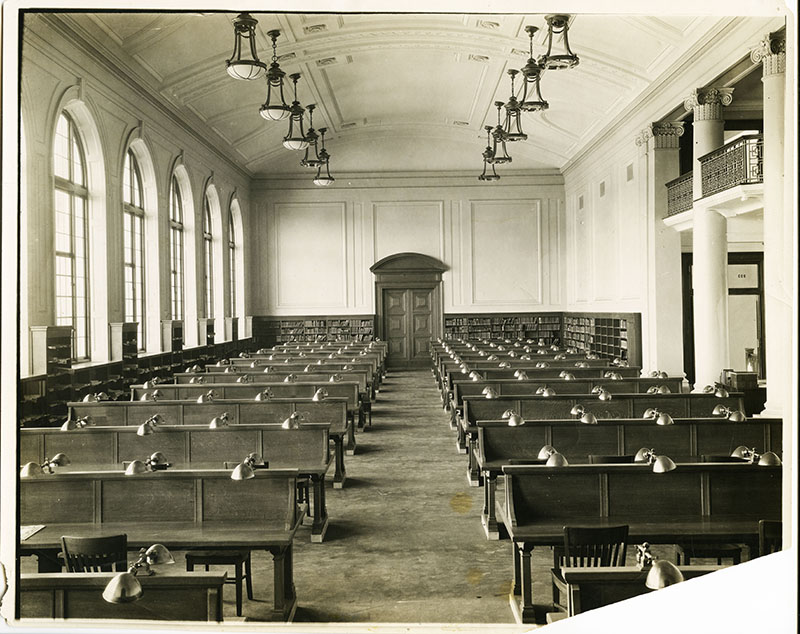
The room was also initially more open to the rest of the library. In a 1915 photograph looking south, no partition separates the room from the hallway; students at the tables could see straight past the columns into what used to be the Delivery Room, where a card catalog was used to request and pick up books. That sightline doesn’t exist anymore. A partition now closes off the gap between the columns, though the archive doesn’t specify exactly when it went up. The old Delivery Room itself was turned into Room 213, a space built in the late 1990s that now houses the library’s Electronic Classroom. At the time, that was the extent of the second floor – there were no east stacks, and the connecting reading room where the cast gallery is now didn’t exist. 

In 1936 a second, connected reading room (now room 202) was added to the Grand Reading Room almost doubling the size of the space. The room’s purpose shifted over the decades: the architect’s 1936 plan shows a desk near the West Stacks doors where books could be requested, and by 1955 the room served as the Reserved Book Reading Room. These changes are easy to miss on a normal walk through the library. To help visitors explore Ellis Library’s past and present, University Libraries maintain a Now and Then Photographs guide, pairing historical images with photos of the same spots today. So, on your next study session, picture the room as it looked in 1915: unfinished, partly lit, and open to the hallway. The quiet space students know now took decades to take shape and included one very delayed paint job. 

Explore more: 
home Ellis Library, Gateway Carousel, Resources and Services Peer Navigator Corner: Who Do I Ask?

Peer Navigator Corner: Who Do I Ask?

Written by: Mekenzie Moffet

Ellis Library isn’t just books – there are many people who can help you, but it can sometimes be confusing to know who to ask. Below is a quick guide to finding the right person!

Peer Navigators

Peer Navigators are a great place to start because we can point you in the right direction—even if that’s another person who can fully answer your question. We can help you find locations throughout the library and assist with basic technology tasks, such as:

  • Directions both inside the library or across campus
  • Fixing common printer problems
  • Downloading the printer software so you can print from your own computer
  • Finding scanners, computers, study spaces, and other library resources
  • Searching the catalog for books and where to find the call number

Circulation Desk

The North and West service desks, also called the Circulation Desk, can help you:

  • Find and check out books
  • Return or renew library materials
  • Ask questions about your library account
  • Checking out equipment like phone chargers, video cameras, or self care and sensory kits

Subject Librarians

Subject librarians are your go-to people for research help. They specialize in different academic subjects and can help you:

  • Find reliable sources for assignments
  • Navigate library databases and tech tools like research AI
  • Develop or narrow down a research topic and create better search terms
  • Find materials related to your major or class
  • Find specialty information like legal policy, data, or statistics

Writing Center

The Writing Center, located in Ellis Library Room 115, can help during any stage of the writing process. You do not need to have a complete draft before making an appointment! They can help with:

  • Brainstorming and organizing ideas
  • Developing a thesis
  • Revising drafts
  • Improving citations
  • Working through writer’s block

Digital Media and Innovation Lab

The Digital Media and Innovation Lab can help with creative and media-based projects. This may include:

  • Recording or editing audio and video
  • Using media equipment and software
  • Working on podcasts, presentations, or other digital projects
  • Learning how to use unfamiliar creative technology

IT Help

For more complicated problems, such as your computer crashing or other high-tech issues, you will need help from IT. Divisions of IT staff are sometimes available at the desk on the first floor next to printer station 3A–D, which is surrounded by “Help Station” posters.

  • Bring anything technological to them

If you are ever unsure about who to ask, don’t be afraid to start with a Peer Navigator. Even if we cannot solve the entire problem ourselves, we can help you find the person who can!

home Ellis Library, Resources and Services Peer Navigator Corner: Digital Media Lab

Peer Navigator Corner: Digital Media Lab

Written by: Mekenzie Moffet

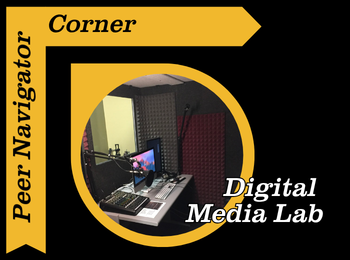
One resource on campus that I feel like a lot of students don’t realize they have access to is the Digital Media Lab located in Ellis Library. If you’ve ever needed to edit a video, record a podcast, create a presentation, or even just want a quiet space with good equipment to work on a project with, this is definitely the space worth checking out. If you’re wanting to try this, don’t let the talk of fancy equipment and reserving space stress you out! There’s always help available, whether you stop by the Peer Navigator desk for help reserving the lab space or get assistance from Digital Media Lab staff while using the equipment!

The Digital Media Lab is designed to give students access to different technology and software that we might not have on our personal laptops. They have high-quality computers with programs like Adobe Audition for video editing, audio recording, graphic design and other creative projects. For students in classes that may require you to make presentations or multimedia assignments, this could be a helpful resource so you don’t have to worry about your personal computer struggling to run larger programs. 

Another really useful part of the lab is the equipment. Things like high quality microphones, cameras, lighting equipment and other recording tools are available for students; whether for school or personal projects! So, if you’re recording a presentation, filming an interview, or working on a creative assignment, having access to that kind of equipment all for free can make a big difference in what you produce.

Just like everything at the library, the labs spaces for recording and editing are completely free! You just have to reserve the space and time like a study room. The Peer Navigators recently got a new project to create our own personal podcast, and I’m one of the people recording our monthly episodes, so trust me when I say I understand the struggle of using this equipment for the first time. During one of our weekly meetings, we met with Joey, who works specifically with the Digital Media Lab, and he walked me and my coworkers through how to use all the equipment and answered any questions we had.

My first recording was a few weeks after that training, so honestly, I didn’t remember much. Thankfully, like always, there was a staff member there who helped refresh our memory, and we were able to get started. Recording itself really isn’t too difficult, even coming from me, someone who’s not great with technology. Another huge plus is that the computers you record on can also be used for editing, and they have GarageBand and Adobe programs available for free. I definitely recommend trying something like this out.

It’s completely okay if you don’t know how to use the equipment yet. When you make a reservation it ensures that some of the amazing staff will be on hand to answer all of your questions, walk you through a program for the first time, help you get started with programs and point you towards resources if you’re learning. That support can make trying out new tools feel a lot less intimidating. Staff are always available in the Digital Media Lab, located in Room 153 on the first floor of Ellis, to help with whatever you need.

Overall, the Digital Media Lab is one of those campus resources that can really elevate your project quality and give you the chance to learn new tools. So go check it out because it’s worth stopping by and seeing what’s available. If you’re having trouble locating their website, just click the Digital Media Lab link located at the top, or go to the libraries home page and search in the box at the top right corner!

home Ellis Library, Gateway Carousel, Resources and Services Peer Navigator Corner: Casts Frozen in Time

Peer Navigator Corner: Casts Frozen in Time

Written by: Lottie Say

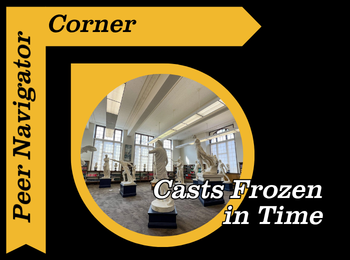
One of my favorite parts of freshman year at Mizzou was exploring Ellis. I recall wandering around The Grand Reading Room and coming across the many statues; I took pictures of them like a tourist. Little did I know these casts held more significance than artistic decor – they are a visible reminder of our university’s long-standing history and commitment to the humanities. These figures are actually precise plaster casts of some of the most famous sculptures in human history. The collection was assembled when 19th and early 20th century students studying ancient Greek and Roman culture in the Midwest were learning about plaster reproductions of famous sculptures. The educator in charge of this awesome, hands-on lesson plan was Professor John Pickard, who was also the first chairman of the Department of Art History and Archeology and creator of the Museum of Art and Archeology in Ellis Library. Pickard was able to travel to Europe in 1895 and 1902 with the mission of bringing the plaster casts home to Missouri. Pickard passed away in 1937, but his legacy lives on through these casts and fellowships named in his honor. 

To truly appreciate that legacy, we must look closer at the plaster itself. These casts are some of the few surviving collections of its type – many were destroyed after World War II and modern museums don’t allow castings any longer since the process can damage the original sculpture. Plaster casts are important in preserving fragile or lost sculptures, the original marble statues of the casts were made over 1000 years ago and have suffered decay since then. Mizzou’s plaster versions are able to maintain crisp details of these figures that have since worn away. Some of the detail can be seen through the thin lines while studying the casts closely, these are called “seam lines” from different multi-piece molds used when crafting the sculpture. Upon first look, these pieces seem heavy and stationary, but the cases are actually incredibly fragile! When moved across campus, multiple people wear gloves to avoid oil transfer along with foam padded carts to prevent breakage. Touching a piece of history would surely be a rush, but similar to the average museum, these pieces must stay as a legacy of ancient art which of course means… no touching! 

In the spirit of college rivalry, Mizzou has had more casts on display than KU for almost two centuries! These casts connect us to the first students of MU, linking our late night study sessions to theirs. Next time you are enjoying the peace in The Grand Reading Room, wander over to its neighbor and observe the stunning casts in room 202!

New Database: Social History Archive

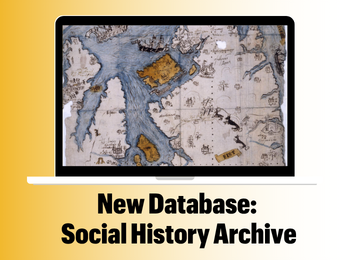
Mizzou Libraries is pleased to provide access to the Social History Archive.

The Social History Archive provides full text of over 2,800 British and Irish newspapers , spanning 1699 to 2014, plus 2,900+ primary sources (vital records, maps & surveys, church, military, hospital, labor & travel records and more),  from the 13th century to 2025 across several countries.

If you have questions about the database or how to use it, contact your librarian at ask@missouri.libanswers.com.

TAGS:

Taira Meadowcroft

Taira Meadowcroft is the Public Health and Community Engagement Librarian at the Health Sciences Library at the University of Missouri.

home Ellis Library, Resources and Services Peer Navigator Corner: Ellis as a 3rd Space

Peer Navigator Corner: Ellis as a 3rd Space

Why Ellis Should be Your 3rd Space
Written By: Emilee Dillon 

Lately, a popular topic of conversation specifically on social media has been the lack of “3rd spaces” for young and emerging adults. There is a distinct lack of places to socialize or relax – a place that isn’t just home or school, somewhere everyone can just go to exist without pressure. 

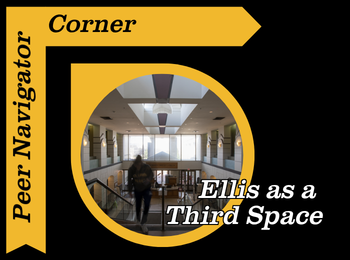
I believe many students are unaware that we have the perfect third space for us right on campus, at Ellis Library. While it is easy to think of Ellis simply as a study spot it has so much more to offer. The Bookmark Cafe located on the ground floor is the perfect place to grab a coffee or a snack, sit down with friends, and have a break. Annalise and Isabella, two of the hosts from our peer navigator student podcast, Between the Stacks, actually talk about how great of a third space the Bookmark Cafe creates. It’s the little things, like microwaves available for all students to use to make meal times or heating something up with friends convenient. 

Ellis is also a great place for readers, not only reading for assignments but enjoyment as well. The Libraries have access to many books that are not strictly academic and is an excellent place to cozy up with a good book. When you first walk up the stairs from the cafe, the well-being collection is directly in front of you, with a shelf full of fiction, books on cooking and crafting, and more. Ellis Library also hosts a BYOBook Club so you can connect with others that have similar interests while still having the freedom to read something you personally choose and will enjoy. Events like this are highlighted on the libraries homepage, but be sure to look up this and others by searching for the libraries on MU Engage! 

Beyond the quiet areas of the library there are more relaxed areas where you can walk around, talk and explore Ellis with your friends, maybe even getting lost in the stacks. Not every corner of the library is designed to be silent, and it is actually a perfect space to socialize in some areas! 

Ellis library also hosts occasional free events such as the calming crafternoons, which are often overlooked. These events can be a great way to meet new people, try something new, or just give you something to do for free! 

Although it may feel like third spaces are disappearing, I believe we may need to just look at it from a different angle, and reimagine this beautiful building our campus has given us. I recommend using Ellis to your full potential and allowing Ellis to be a place you can connect, relax, and build your community. 

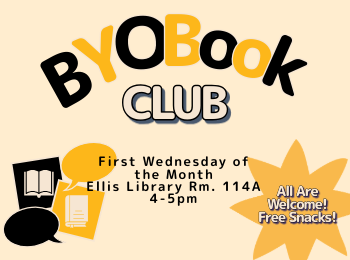
BYOBook Club at Mizzou Libraries

Do you want to join a book club but prefer to choose your own book?

Join us at BYOBook Club! Read any book for the month’s (optional) prompt and chat with other readers about what you chose. This is a great way to discover new books and authors—or rant about pesky plot holes.

  • September 2nd – Favorite summer read
  • October 7th – Banned book
  • November 4th – New perspectives (book from a language/culture/POV different from you)
  • December 2nd – Resistance! (fiction or nonfiction)

You can find book recommendations and more on our BYOBook Club guide: libraryguides.missouri.edu/byobook-club

This club is sponsored by Mizzou Libraries Outreach and Engagement Committee.

Registration is encouraged but not required.

Mizzou Libraries Reading Challenge

Mizzou Libraries invites the campus community (students, staff, and faculty) to join our inaugural campus-wide Reading Challenge! This challenge runs from September 2026 to April 2027.

Read (or listen to) a book each month based on that month’s theme, tell us about it, and be entered into win one of our monthly prizes. Complete all 8 months to be entered in to the grand prize drawing.

Select this link to learn more about the Mizzou Libraries Reading Challenge: https://libraryguides.missouri.edu/readingchallenge


Summer Reading Recommendations from Mizzou Librarians

We asked Mizzou Librarians to tell us what their favorite read of the summer was and of course they had a lot to share!

In this list, you will find beach reads and dense reads. Fiction and non-fiction. This list has a little for everyone, no matter your reading tastes.

You can access the list using this link.

Happy reading!

Taira Meadowcroft

Taira Meadowcroft is the Public Health and Community Engagement Librarian at the Health Sciences Library at the University of Missouri.

home Ellis Library, Gateway Carousel, Resources and Services, Staff news Peer Navigator Corner: Movies and Film

Peer Navigator Corner: Movies and Film

Written by: Annalise Miller

Ellis Library offers a wide range of film resources to support both classroom instruction and personal viewing. Although our campus library has limited streaming services, students and faculty still have access to some excellent alternatives. MU students and faculty can search Discover@MU on the University of Missouri Libraries website to find video materials in multiple formats, including DVD and film, making it easy to locate content for class, research, or just for fun.

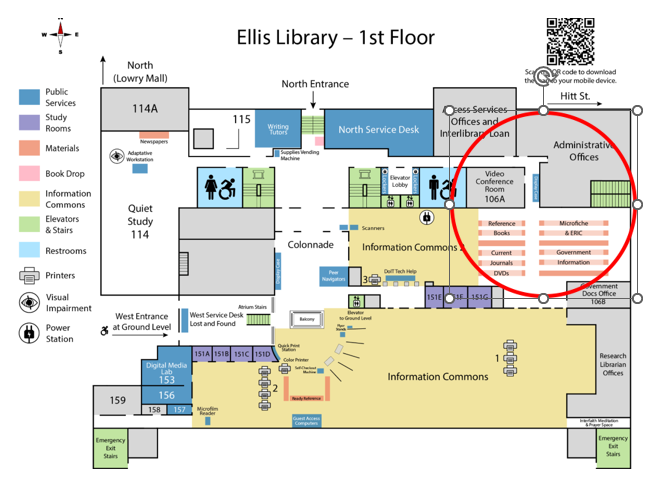
If you prefer browsing in person, DVDs are available on the south side of the Reference stacks near the Information Commons on the first floor of Ellis Library.

You can also search the library catalog to locate specific titles or explore a curated list of films available at Ellis. Don’t have a DVD player? No worries – they are available for checkout at the North Service Desk on the first floor of Ellis!

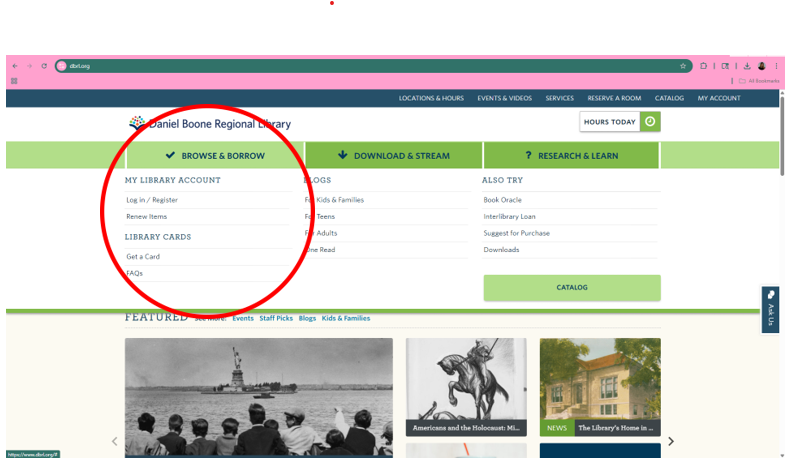
For free streaming options, students can obtain a library card from the Daniel Boone Regional Library. This is a simple process that can be completed online at dbrl.org. Once on the site, select “Browse and Borrow,” to pull up a drop-down window, where you will then select “Get a card,” and apply online. Daniel Boone regional library has access to both Kanopy and Hoopla, free streaming service for popular movies and shows.

Happy watching, Tigers!